
心に残った言葉を、そばに。Keep the words that stay with you.
本や会話、日々のなかで出会った言葉を、あなたのストックに。
明朝体の縦書きで、一枚ずつ静かに読み返せます。Save the words you meet in books, in conversation, and in everyday life.
Read them back quietly, one at a time, in vertical Japanese type.
-
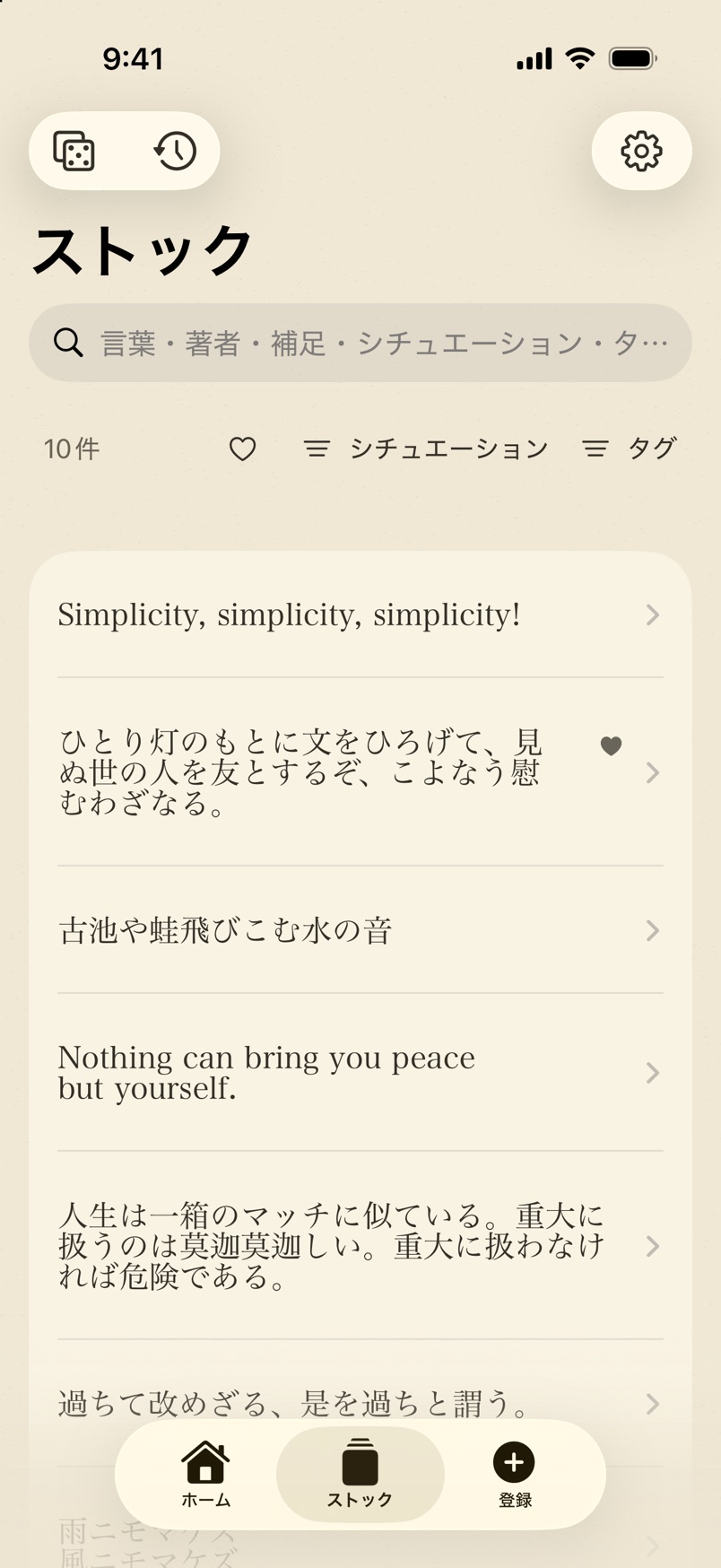
Stock残した言葉を、一覧で探すFind any word you’ve saved
-
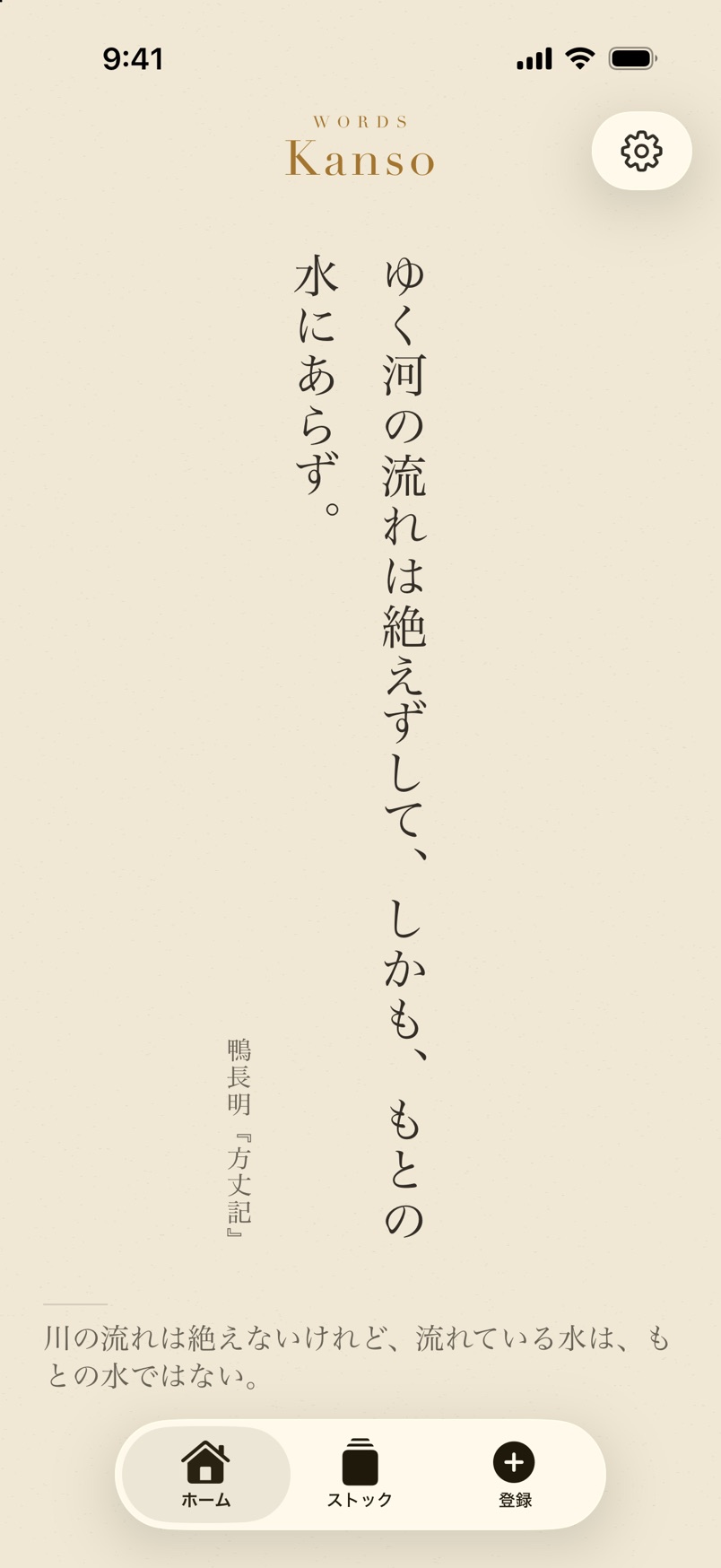
Home一枚ずつ、縦書きで読むOne at a time, set vertically
-
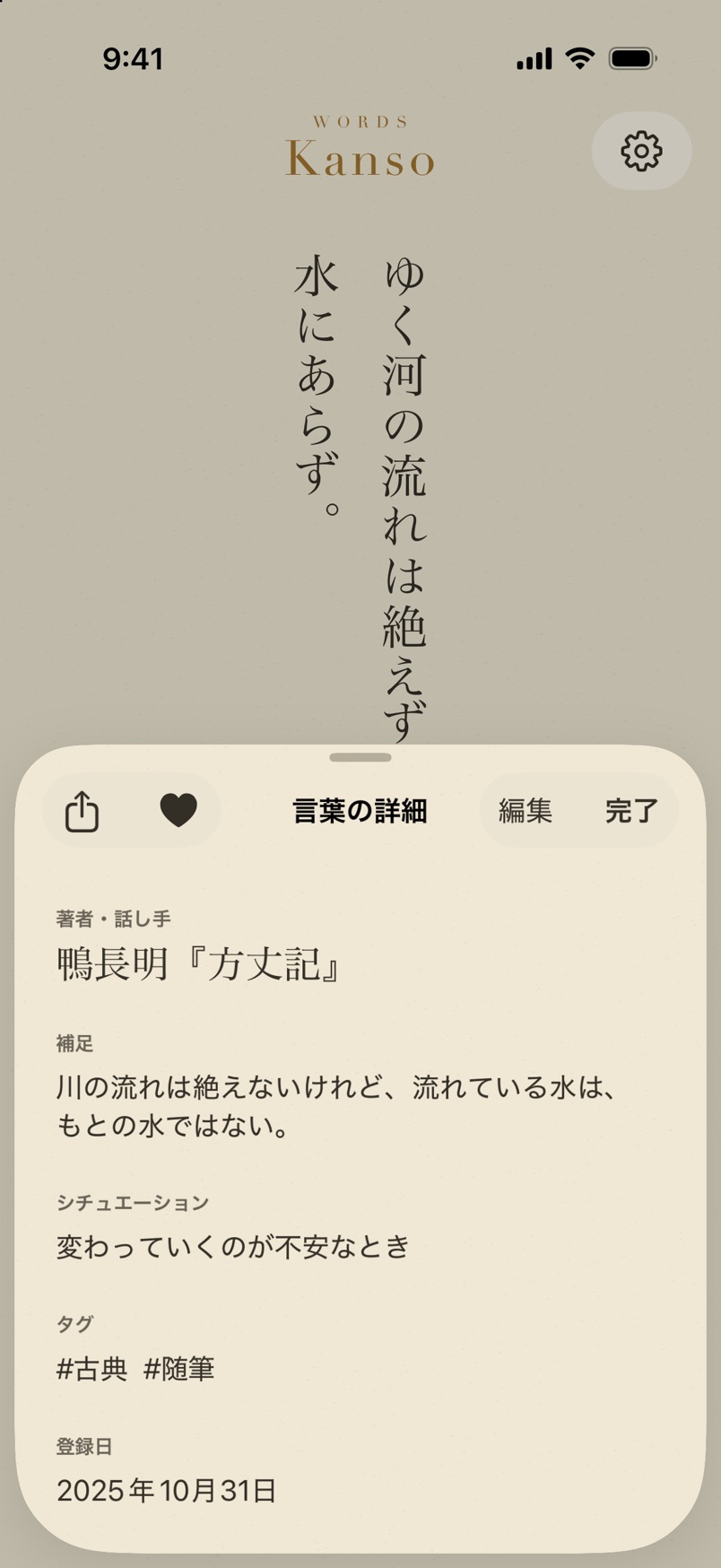
Details誰の言葉か、どんなときの言葉かWho said it, and for which moment
はじめにThe idea
心が動いた言葉も、
書きとめなければ、
いつのまにか忘れてしまう。
残しておけば、
必要なときに、また会える。Even the words that moved you
slip away
if you don’t write them down.
Keep them,
and you can meet them again when you need them.
Kanso - Words は、そのための余白だけを用意したアプリです。簡素(かんそ)——余分なものを取り除き、大切なものだけを残す。その考え方を、言葉の置き場所にしました。Kanso - Words gives you only the space for that. Kanso — taking away what is extra and keeping only what matters — made into a place for words.
全体像The whole flow
出会った言葉に、また会うまでFrom meeting a word to meeting it again
-
01
残すKeep
言葉に、誰の言葉か・補足・シチュエーション・タグ・写真を添えて。本のページは撮って読み取れます。Add who said it, a note, the situation, tags, and a photo. A book page can be photographed and read.
-
02
読むRead
ホームに一枚ずつ大きく。5秒ごとに、静かに次の言葉へ移ります。One word at a time, large, on Home. Every five seconds it moves quietly to the next.
-
03
引くDraw
いまのシチュエーションを選んで、そのときのために残した一枚を引きます。Choose the moment you’re in, and draw one word you saved for it.
-
04
振り返るLook back
1年前の今日に残した言葉や、何度も読み返した言葉に、また会えます。Meet again the words you saved on this day a year ago, and the ones you return to most.
読むRead
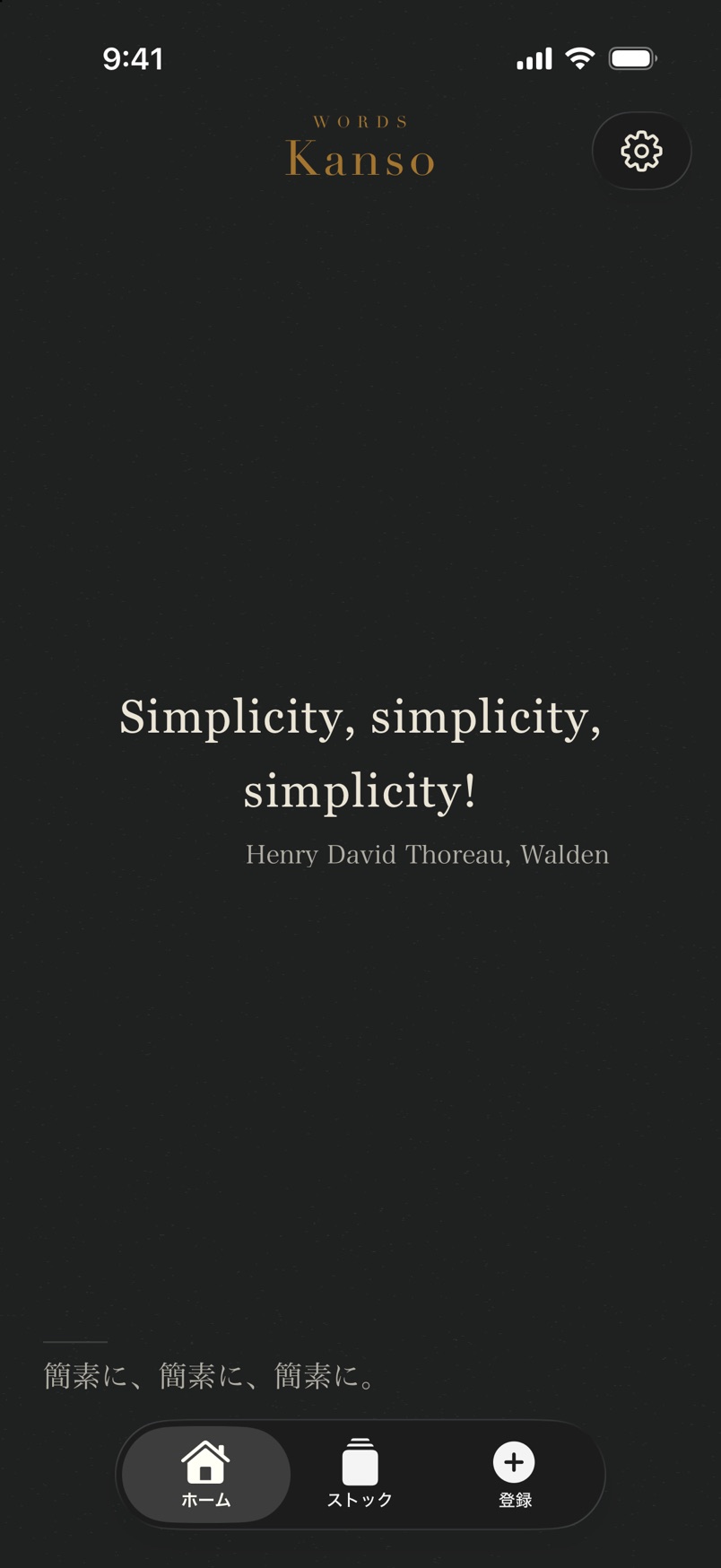
日本語は縦書き、英語は横書きで。Japanese set vertically, English set across.
日本語の言葉は明朝体の縦書きで、長い言葉は右から読み進めます。英語の言葉は、いつも横書きのセリフ体。紙の色は生成り・白・セピア・墨の4つ(白・セピア・墨は Kanso Words Pro)、文字の大きさは5段階から選べます。ホームでは5秒ごとに次の言葉へ静かに切り替わり、左右にスワイプして送ることもできます。Japanese words appear vertically in Mincho type, and long ones read from right to left. English words are always set horizontally in a serif. Choose from four papers — natural, white, sepia, and ink (the last three with Kanso Words Pro) — and five text sizes. On Home, a new word fades in every five seconds, or swipe to move on yourself.
- 縦書き・横書きVertical or horizontal
- 紙の色 4種4 paper colors
- 文字サイズ 5段階5 text sizes
- 補足の表示切替Show or hide notes
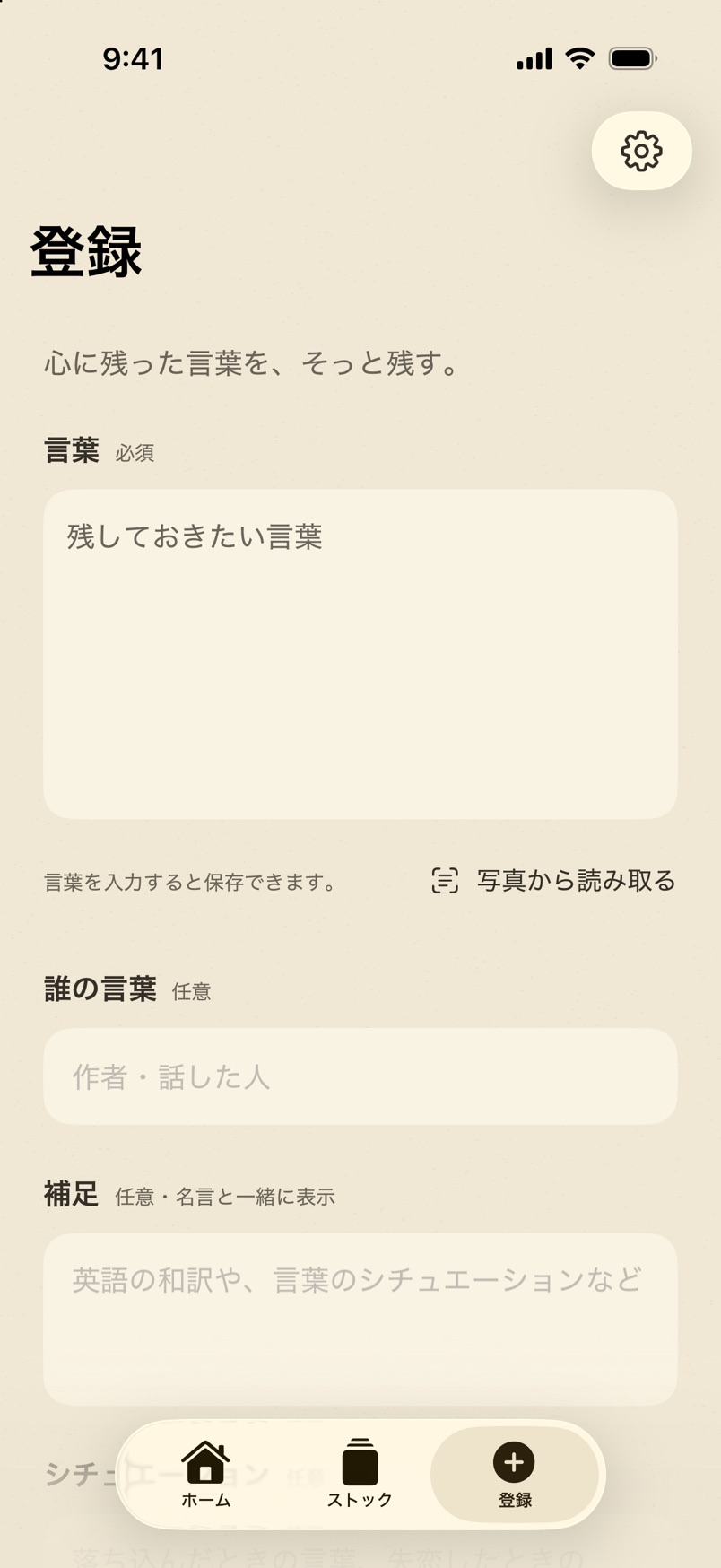
残すKeep
出会った言葉を、その場で残す。Keep a word the moment you meet it.
言葉の本文に、誰の言葉か、和訳などの補足、どんなときの言葉か(シチュエーション)、タグ、写真を添えられます。本のページは「写真から読み取る」で撮ると、端末の中で文字を読み取り、確かめてから本文に入れられます。Safari などの共有メニューから、選んだ文章をそのまま送ることもできます。Add who said it, a note such as a translation, the moment it’s for (a situation), tags, and a photo. Photograph a book page with Read from photo, and the text is recognized on your device for you to check before it goes in. You can also send selected text straight from the share menu in Safari and other apps.
- 写真から読み取るRead from photo
- 縦書きの本にも対応Vertical Japanese too
- 共有メニューからFrom the share menu
- 写真を添えるAttach a photo
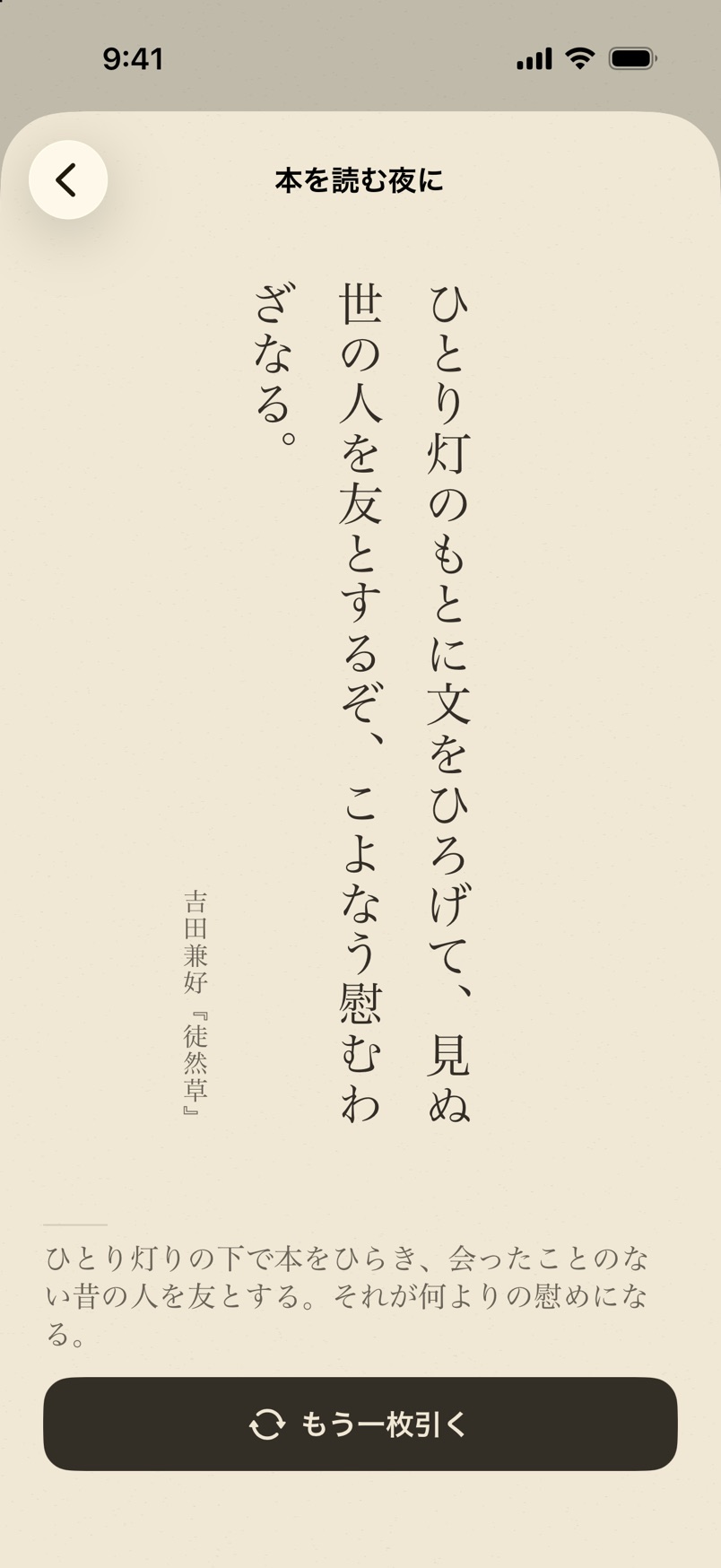
引くDraw
いまの気分で、一枚引く。Draw one for how you feel now.
ストックのサイコロから、シチュエーションを選びます。「落ち込んだとき」「本を読む夜に」——その場面のために残しておいた言葉から、一枚だけが現れます。気が向いたら、もう一枚。Tap the dice in Stock and choose a situation. “When I feel low.” “A night with a book.” One word appears from the ones you kept for that moment. Draw another if you like.
探すのではなく、出会い直す。Not searching — meeting again.
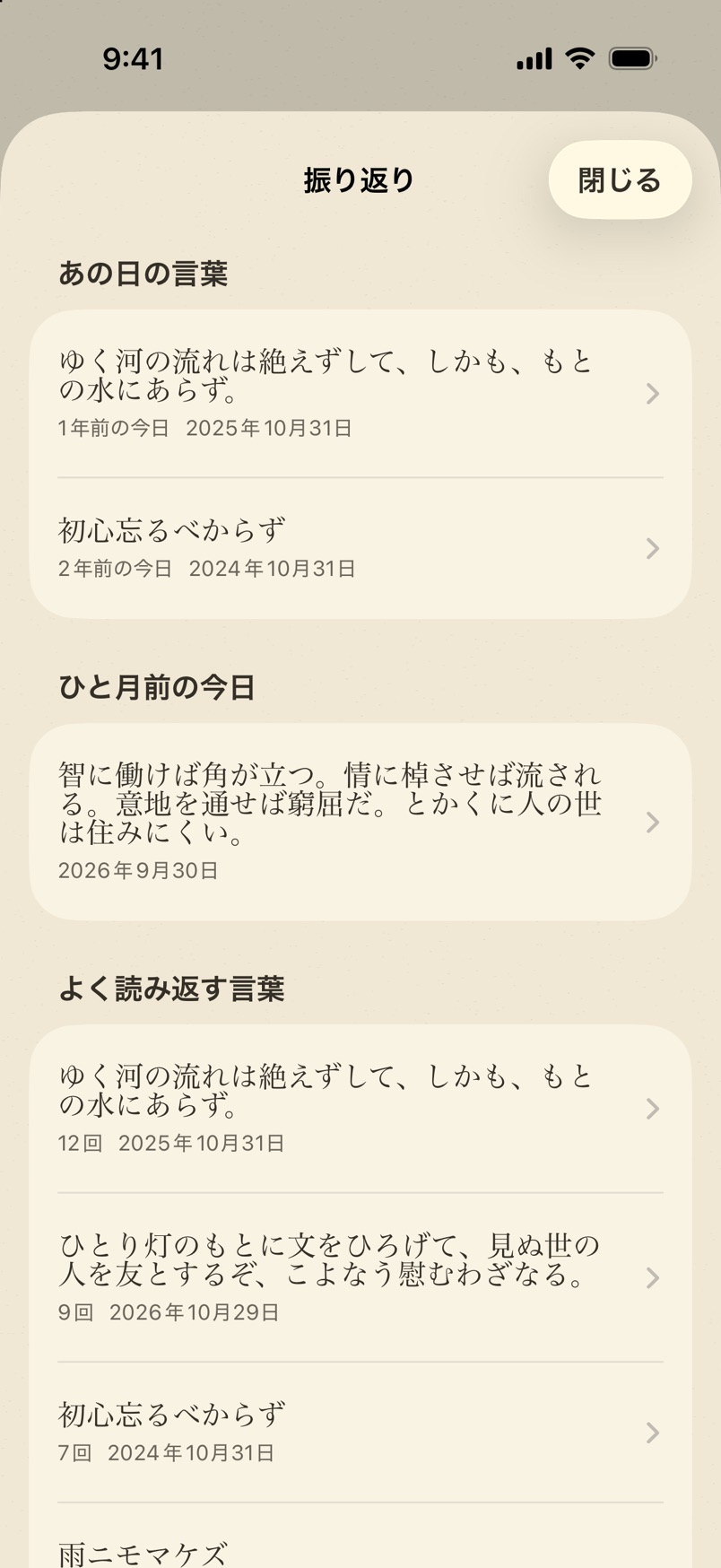
振り返るLook back
あの日の言葉に、また会う。Meet that day’s words again.
振り返りには、1年前・2年前の今日に残した言葉、ひと月前の今日の言葉、よく読み返す言葉、お気に入りが並びます。残し続けるほど、過去の自分が選んだ一行が、今日の自分に届くようになります。Look back gathers the words you saved on this day in past years, the ones from a month ago today, the ones you read most, and your favorites. The longer you keep words, the more often a line chosen by your past self reaches you today.
- あの日の言葉On this day
- ひと月前の今日A month ago today
- よく読み返す言葉Most read
- お気に入りFavorites
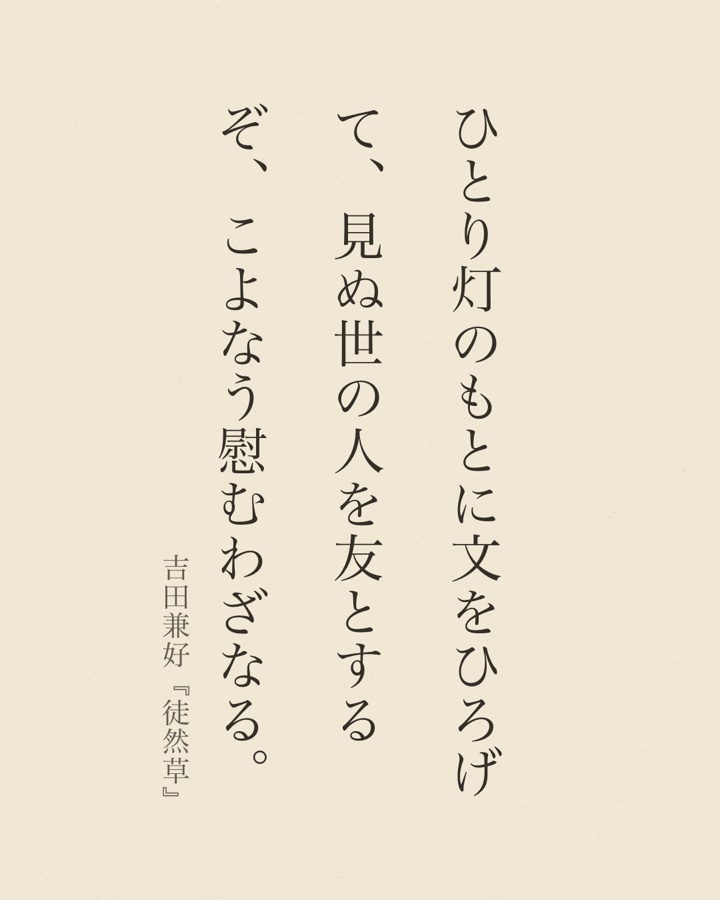
画像で共有Share as an image
言葉を、一枚の紙に。Your words, on a single sheet.
言葉の詳細から、正方形・縦長・ストーリーズ・横長の4つの形で、選んでいる紙の色と書き方向のまま画像にできます。シチュエーションやタグ、写真は入らず、言葉だけが残ります。From a word’s details, make an image in four shapes — square, portrait, stories, and landscape — on your chosen paper and in your chosen direction. Situations, tags, and photos stay out; only the words remain.
ほかにもAnd more
言葉が、暮らしのそばにあるように。So your words stay close by.
ウィジェットWidgets
ホーム画面・ロック画面・スタンバイに、今日の言葉を一日ひとつ。お気に入りだけにも絞れます。One word a day on your Home Screen, Lock Screen, and StandBy. Limit it to favorites if you like.
毎日の言葉A daily word
オンにすると、決めた時刻に一日ひとつ、言葉が通知で届きます。Turn it on, and one word arrives as a notification at the time you choose.
探すSearch
言葉・誰の言葉・補足・シチュエーション・タグをまとめて検索し、絞り込めます。Search across the words, who said them, notes, situations, and tags, and filter the list.
お気に入りFavorites
ハートを付けた言葉だけを、すぐに並べられます。Show only the words you’ve marked with a heart.
補足を添えてNotes underneath
和訳や、そのときの状況を、言葉の下に小さく。表示しないこともできます。Put a translation or the story behind it in small type below the words, or hide notes altogether.
iCloud 同期iCloud Sync
同じ Apple Account の iPhone・iPad で、言葉と写真がそろいます。Your words and photos match across iPhone and iPad with the same Apple Account.
書き出し・読み込みExport & import
写真ごとの完全なバックアップ(JSON)と、表計算用の CSV に書き出せます。Export a full backup with photos (JSON), or a CSV for spreadsheets.
読みやすさAccessibility
端末の文字の拡大設定や VoiceOver にも対応しています。Works with larger text settings and VoiceOver.
安心のためにPeace of mind
言葉は、あなたの手元に。Your words stay with you.
残した言葉は端末の中に保存され、開発者のサーバーへ送ることはありません。iCloud 同期は、あなた自身の iCloud に保存します(初めからオンで、設定でオフにできます)。The words you keep are stored on your device and never sent to the developer’s servers. iCloud Sync saves only to your own iCloud. It starts on, and you can turn it off in Settings.
登録なしNo sign-up
アカウントもログインも必要ありません。No account and no login required.
広告・解析なしNo ads or analytics
広告やアクセス解析の仕組みは入れていません。There are no ads and no analytics inside.
写真の扱いYour photos
添えた写真から位置情報などを取り除き、読み取りに使った写真は保存しません。Attached photos are saved without location data, and photos used for reading text are not kept.
くわしくは プライバシーポリシー をご覧ください。For the details, see the Privacy Policy.
よくある質問Frequently asked questions
料金はかかりますか。Is it free?
言葉を10件まで、無料で残せます。ウィジェット・毎日の言葉・画像で共有・書き出し・iCloud 同期も無料です。買い切りの Kanso Words Pro にすると、言葉を件数の上限なく残せて、紙の色を4つから選べます。Pro にしなくても、残した言葉が消えることはありません。You can keep up to 10 words for free, and widgets, the daily word, sharing as an image, export and iCloud Sync are free too. Kanso Words Pro, a one-time purchase, removes the word limit and unlocks all four papers. Without Pro, nothing you kept is ever removed.
英語の言葉も残せますか。Can I keep English words, and is the app in English?
はい。英語の言葉は、いつも横書きのセリフ体で表示します。アプリの画面は、いまは日本語のみです。English words are fully supported and always shown horizontally in a serif typeface. The app’s screens are in Japanese for now.
iPhone と iPad で同じ言葉を使えますか。Can I use the same words on iPhone and iPad?
同じ Apple Account でサインインしていれば、iCloud 同期で言葉と写真がそろいます。書き出したファイルからの読み込みにも対応しています。Yes. When both are signed in with the same Apple Account, iCloud Sync keeps your words and photos in step. You can also import from an exported file.
「写真から読み取る」で撮った写真は残りますか。Is the photo I use for Read from photo kept?
いいえ。文字の読み取りは端末の中で行い、写真そのものは保存しません。No. The text is recognized on your device, and the photo itself is not saved.
本の一節を画像にして SNS に載せてもいいですか。May I post a passage from a book as an image?
ご自身で読み返すぶんには、自由にお使いください。公開するときは、出典を添えるなど、引用の範囲にとどめてください。For your own reading, use it freely. When you post it publicly, keep it within quotation — for example, by naming the source.
Contact
お気軽にどうぞ。Get in touch.
ご質問・ご感想・不具合のご報告など、こちらからどうぞ。Questions, feedback, or bug reports — we’d love to hear from you.